Scan & Go
Redesigning an in-store self-checkout experience by separating journeys and enabling frictionless retail within Decathlon’s mobile ecosystem
UI/UX
Product Design
Retail
Project Overview
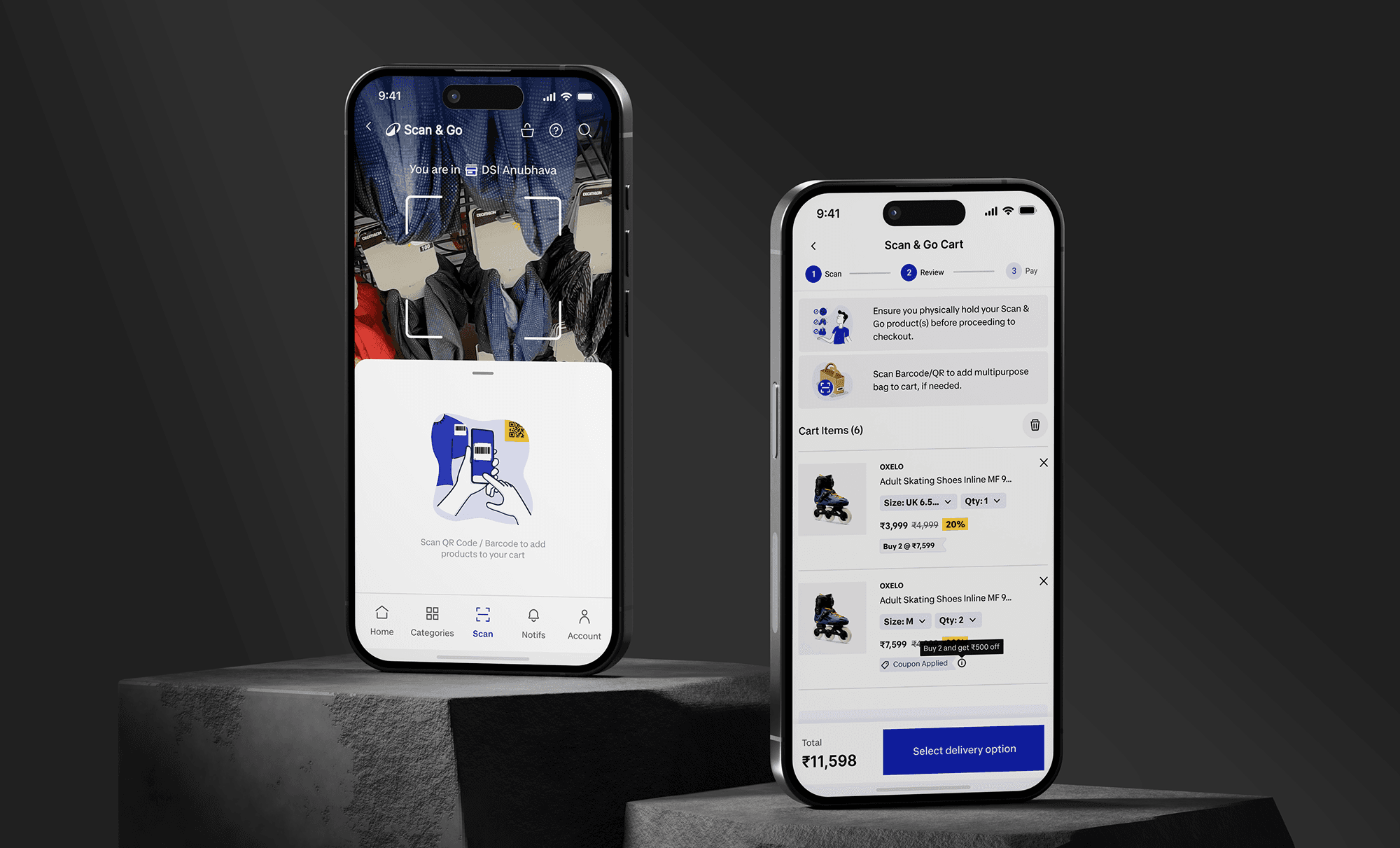
Scan & Go (formerly Scan & Pay) was one of Decathlon’s earliest digital innovations, allowing customers to scan products in-store, pay via the app, and exit seamlessly using a digital receipt.
With the evolution of Decathlon into a full e-commerce platform, the feature became part of a larger ecosystem—introducing complexity in user journeys, cart management, and checkout behaviors.
This project focused on redesigning the Scan & Go experience to:
Eliminate confusion between in-store and online shopping
Create a fast, intuitive self-checkout flow
Align the experience with Decathlon’s new design system
Improve operational efficiency at store level
Scan & Go also represented a significant business opportunity, contributing:
600K+ app orders
~12.86% of total digital turnover
500K+ app downloads within stores
28% repeat usage rate
Platform: Mobile App (iOS & Android)
Platforms: Native (iOS & Android)
My Role: I led the end-to-end UX/UI redesign of the Scan & Go experience, focusing on simplifying the in-store journey while resolving conflicts with the e-commerce flow. I redefined user flows, introduced a decoupled cart architecture, and redesigned critical touchpoints such as scanning, cart, and order summary. I also worked on improving usability for real-world scenarios like store exit validation. Throughout the project, I collaborated closely with product, engineering, and store operations teams to ensure the experience was intuitive, scalable, and aligned with both user needs and in-store workflows.
Problem Statement:
Scan & Pay was initially designed as a standalone in-store checkout solution. However, with the introduction of e-commerce into the same app, both journeys began to overlap—creating confusion, errors, and friction.
Users struggled to differentiate between carts meant for in-store checkout and those intended for home delivery. This often resulted in accidental delivery orders instead of immediate checkout, breaking the core promise of speed and convenience.
Additionally, the experience did not account for real-world store interactions such as quick security verification, and lacked guidance during scanning, onboarding, and error scenarios.
Existing app Pain Points:
Single cart system handling both Scan & Go and e-commerce journeys
High user error rate due to unclear distinction between delivery vs takeaway
No contextual entry point for in-store experience (Scan buried within app)
Lack of guidance during scanning (first-time users struggled)
Inefficient order summary for store exit validation
No prioritization of high-value items for quick security checks
Missing price clarity (MRP vs discounted price mismatch)
Higher cognitive load due to lack of system-driven guidance
Information architecture:
The experience was restructured to support a clear and contextual in-store journey:
Dedicated Scan Entry Point: Introduced a sticky “Scan” CTA triggered by store location detection
Decoupled Cart System: Separate carts for Scan & Go and e-commerce journeys
Location-Aware Experience: Enabled store detection to activate relevant UI states and features
Integrated Scan-to-Cart Flow: Real-time cart updates within the scanning interface
Optimized Exit Flow: Redesigned order summary for quick validation at store exit
Wireframes Mockups:
Explored unified vs separated cart architectures → validated need for full decoupling
Tested different onboarding methods (instruction popups vs guided UI)
Iterated on scan interface to reduce friction and improve success rate
Evaluated multiple order summary layouts for real-world usability
Final Direction: Built a context-aware, fully decoupled Scan & Go journey optimized for speed, clarity, and physical store interactions.
Solution:
Key Features:
Context-Aware Entry (Location Triggered): Sticky scan CTA appears only when user is at store, improving discoverability
Guided Scanning Experience: Instructional overlays, error handling flows, and fallback search for failed scans
Real-Time Scan Cart: Items instantly added and visible within the scanning screen
Decoupled Cart Architecture: Clear separation between in-store and online shopping journeys
Optimized Order Summary & QR Validation: Larger QR code, structured layout, and prioritized item listing for quick security checks
UI Design:
Sticky scan button increased visibility and reduced entry friction
Inline cart within scan screen reduced navigation steps
Instructional UI improved first-time user success rates
Order summary redesigned with:
High-value-first sorting
Clear MRP vs discounted price display
Scannable QR code for quick validation
Full adoption of Decathlon’s new design system for consistency and scalability
Outcomes:
Reduced steps from app launch to scan, improving onboarding efficiency
Improved in-store conversion through better discoverability and guidance
Significant reduction in user errors related to wrong checkout type
Faster store exit validation due to optimized order summary design
Increased adoption driven by:
500K+ in-store app downloads
600K+ Scan & Go orders
Improved repeat usage (28% repeat rate) indicating higher user trust and satisfaction
Contributed to ~12.86% of digital revenue, showcasing strong business impact
Key Learnings:
Hybrid experiences (physical + digital) require strong contextual boundaries
Reducing steps and cognitive load is critical in high-mobility environments like stores
Designing for real-world actors (e.g., security staff) is as important as end users
Visibility and guidance can significantly improve feature adoption
Operational alignment (store staff, layouts, communication) plays a key role in UX success